


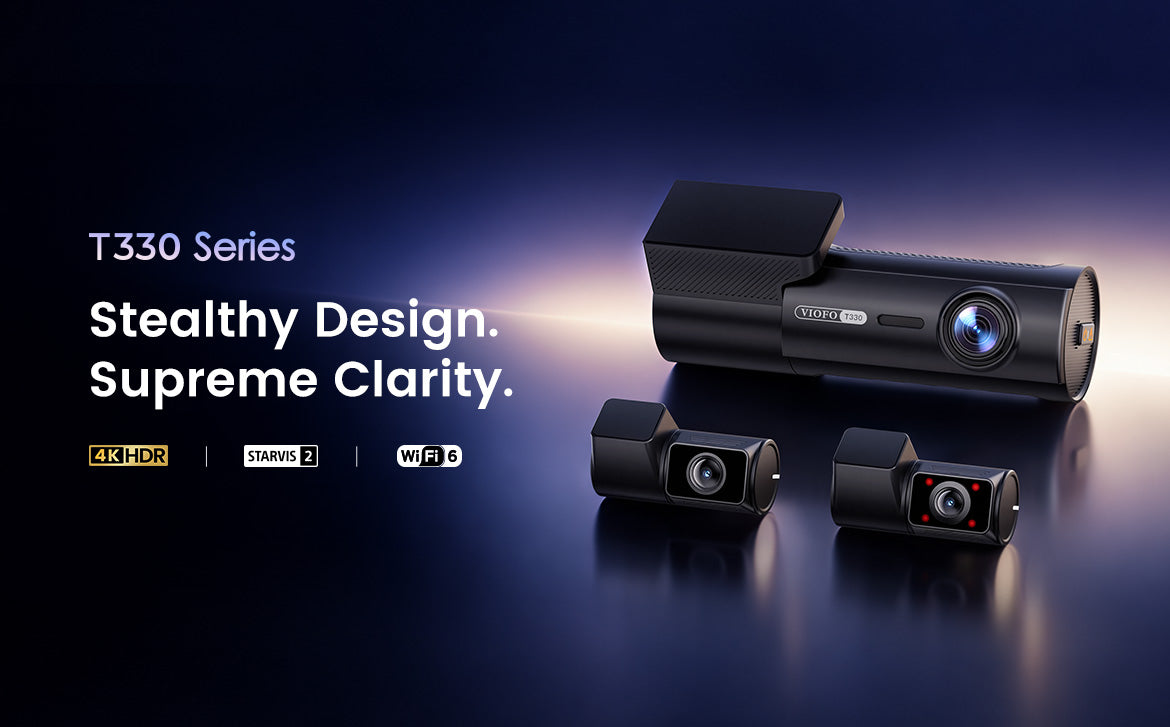
Built with a compact, screen-free design, the VIOFO T330 Series stays discreetly behind the rearview mirror while capturing what matters on the road. Ranging from a 210° fisheye cabin camera and a 4x optical zoom telephoto camera to waterproof exterior cameras, this lineup offers multiple camera combinations for various vehicles and driving habits.
Whether you're setting up your T330 for the first time or looking to maximize its performance, this guide covers the key features, recommended settings, installation tips, parking protection, and answers to common questions.
Which T330 Model Is Right for You?
Not sure which T330 configuration fits your vehicle? Use the quick comparison table to choose based on your specific coverage needs.
| Model | Camera Setup | Best For |
| T330 2CH | 4K Front + 2K Rear | Everyday front & rear coverage |
| T330 3CH | 4K Front + 2K Rear + 2K Cabin | Rideshare, taxis & family vehicles |
| T330T 3CH | 4K Front + 2K Rear + 2K Telephoto | Capturing vehicles & plates farther ahead |
| T330W 2CH | 4K Front + 2K Waterproof Rear | Pickups, vans & exterior rear coverage |
| T330W 3CH | 4K Front + 2K Cabin + 2K Waterproof Rear | Cabin + exterior rear coverage |
| T330WW 3CH | 4K Front + Dual 2K Waterproof Cameras | Wider exterior coverage |
| T330TW 3CH | 4K Front + 2K Telephoto + 2K Waterproof Rear | Telephoto + exterior rear coverage |
What Makes the T330 Stand Out?
1. Crystal-Clear Video, Day and Night
Powered by Sony STARVIS 2 sensors, the T330 lineup delivers exceptional footage in both bright and low-light environments.
▪️High-Resolution Multi-Channel Coverage: The T330 3CH, for example, records in 4K + 2K + 2K with Sony STARVIS 2 sensors on all three channels.
▪️Advanced HDR: HDR helps balance bright headlights, deep shadows, and high-contrast scenes, making important details like license plates easier to capture.
▪️High Frame Rate Option: For drivers who prefer smoother front footage, the T330 2CH supports up to 4K 60fps (switches to 4K 30fps when HDR is enabled).
Pro Tip: Choose 4K 60fps when smoother motion matters; switch to HDR when challenging lighting is the priority. 
2. Discreet, Screen-Free Design
While a built-in screen can be helpful during initial setup, most drivers rarely look at a dash cam once installed.
The T330's screen-free barrel-shaped design lets the front camera tuck neatly behind your rearview mirror, maintaining an unobstructed view while recording quietly in the background. Instead of navigating menus on a tiny display, simply connect to the VIOFO Dashcam App to check the camera angles, tweak settings, or review footage.
This design works particularly well if you prefer:
▪️A cleaner windshield installation
▪️Fewer visual distractions while driving
▪️A dash cam that attracts less attention
▪️App-based settings and footage management
Once properly positioned and configured, daily operation can be largely hands-off. 
3. Flexible Camera Options That Fit Your Needs
The T330 Series goes beyond standard front-and-rear layouts:
▪️210° Fisheye Cabin Camera: Perfect for rideshare drivers and families. Its ultra-wide 210° field of view provides a broad view of the cabin and side windows, while infrared LEDs help maintain visibility in dark interiors.
▪️4x Optical Zoom Telephoto Camera: Designed for drivers who want a closer view of vehicles and license plates farther ahead. It complements the wide-angle front camera with a tighter perspective.
▪️Waterproof Exterior Camera: Ideal for pickups, trucks, vans, vehicles with heavily tinted rear glass, or installations where an exterior-mounted camera provides a clearer view. 
4. Parking Mode: Choose the Right Protection for How You Park
With the optional VIOFO HK6-F hardwire kit / BP60 / BP100, the T330 Series supports multiple parking modes.
| Parking Mode | Best For | Main Advantage |
| Hybrid Parking Recording | Daily & overnight parking | Balance coverage and power protection |
| Low Power Impact Detection | Long-term parking | Lowest power consumption |
| Low Bitrate Recording | Short- to medium-term parking | Continuous video with lower file sizes |
| Time-lapse Recording | Extended parking |
Continuous visual coverage without audio |
| Auto Event Detection | Busy parking areas | Records detected motion and impacts |

5. Wi-Fi 6: Fast and Seamless Access
When an incident occurs on the road, you want to review footage immediately. The T330 supports dual-band 2.4GHz and 5GHz Wi-Fi 6, allowing you to connect smoothly to the VIOFO Dashcam App for live previews, settings adjustments, and fast downloads.
T330 Setup Tips
Get Better Footage from Day One
The right installation and settings can matter just as much as the camera specifications.
1. Choose the Right Mounting Position
Tip: Always check the live view via the app before securing.
▪️Front Camera: Mount it high on the windshield behind the rearview mirror within the wiper sweep area. 
▪️Fisheye Cabin Camera: Mount near the top center of the windshield or headliner to cover the cabin and side windows. 
▪️Telephoto Camera: Mount close to the front camera and aim straight down the road (a narrower field of view demands more precise alignment). 
▪️Standard Rear Camera: Mount inside near the top center of the rear windshield, positioning the lens to minimize obstruction from defroster lines. 
▪️Waterproof Rear Camera: For T330W, mount the waterproof rear camera externally at the rear of the vehicle, such as near the license plate or tailgate. For T330WW, mount the two waterproof cameras under the side mirrors to provide wider side coverage. 
2. Don't Point Too Much of the Camera at the Sky
A common installation mistake is tilting the front camera too high. Too much sky leaves less of the road in the frame and may affect exposure.
Keep the road as the main part of the image while leaving enough space above the horizon for traffic lights and road signs.
3. Use HDR When Lighting Is Difficult
Leverage HDR in high-contrast scenes (night headlights, tunnels, strong sunlight, reflective plates) rather than focusing solely on frame rates.
4. Keep the CPL Installed Correctly
The magnetic front CPL included with the T330 packages helps reduce windshield reflections and road glare.
Make sure the CPL is clean and correctly positioned before driving. Dirt, fingerprints, or incorrect positioning can reduce image quality instead of improving it.
5. Use a Reliable microSD Card
The T330 supports cards up to 512GB. Choose a reliable microSD card (VIOFO / SanDisk Max Endurance) built for continuous write cycles and format regularly.
6. Protect Important Clips
Loop recording automatically overwrites older unprotected files when the memory card fills up. Use voice commands, the emergency lock button, the Bluetooth remote, or G-sensor auto-lock to protect clips before loop recording overwrites them. Then back up the important clip to your phone or another device when practical.
How to Set Up Parking Mode
Standard cigarette-lighter power usually turns off when the vehicle is switched off, so an additional power solution is required for parking recording.
▪️Use the HK6-F hardwire kit designed specifically for the T330/T340 series to enable hardwired parking mode and battery protection.
▪️Alternatively, use compatible VIOFO battery packs like the BP60 or BP100.
Quick Setup Steps:
1. Connect the T330 to the HK6-F kit or battery pack.
2. Open the VIOFO Dashcam App and go to camera settings.
3. Select the parking mode that best fits your parking needs and configure cut-off settings if using Hybrid mode.
4. Confirm that the camera switches correctly between normal and parking recording.
T330 FAQs
Q1: Why choose a screen-free dash cam?
It allows for a more compact, discreet installation behind the rearview mirror, keeping your windshield clean and distraction-free. All settings and video playback are managed through the app.
Q2: Are A329S Series accessories compatible with the T330 Series?
Yes, most standard accessories are compatible. The rear, waterproof rear, telephoto, and fisheye cabin cameras from the A329S series can be used with the T330 Series.
Note on Hardwire Kits & Power Cables: While older power cables and hardwire kits (such as the HK4 or HK6) will power the camera, their connector designs prevent the installation of the T330's tamper-resistant cover.
Q3: How do I install the tamper-resistant cover?
Connect and organize cables first. We recommend fitting the tamper-resistant cover before mounting the main camera onto the windshield mount for easier installation.
Q4: How do I check the camera angle without a screen?
Turn on the dash cam's Wi-Fi and use the live preview feature in the VIOFO Dashcam App. You can also use the screen grid to assist with precise alignment. This step is especially crucial for the telephoto camera due to its narrow field of view.
Q5: Can I view multiple camera angles in one video?
Yes. The T330 supports Multiplex Video, combining multiple synchronized feeds into a single video file for effortless multi-angle playback and sharing.
Q6: What do I need to use Parking Mode on the T330?
The T330 can use the HK6-F hardwire kit or compatible VIOFO battery packs such as the BP60 and BP100 for parking recording. With these power solutions, the T330 supports Hybrid Parking Recording, Low Power Impact Detection, Low Bitrate Recording, Time Lapse Recording, and Auto Event Detection.
Final Thoughts
The new T330 Series offers the flexibility to choose the coverage that fits the vehicle and driving style. Start with discreet 4K front recording and scale up with cabin, telephoto, or waterproof exterior options as needed.
Ready to find the right setup? Explore the T330 Series now!