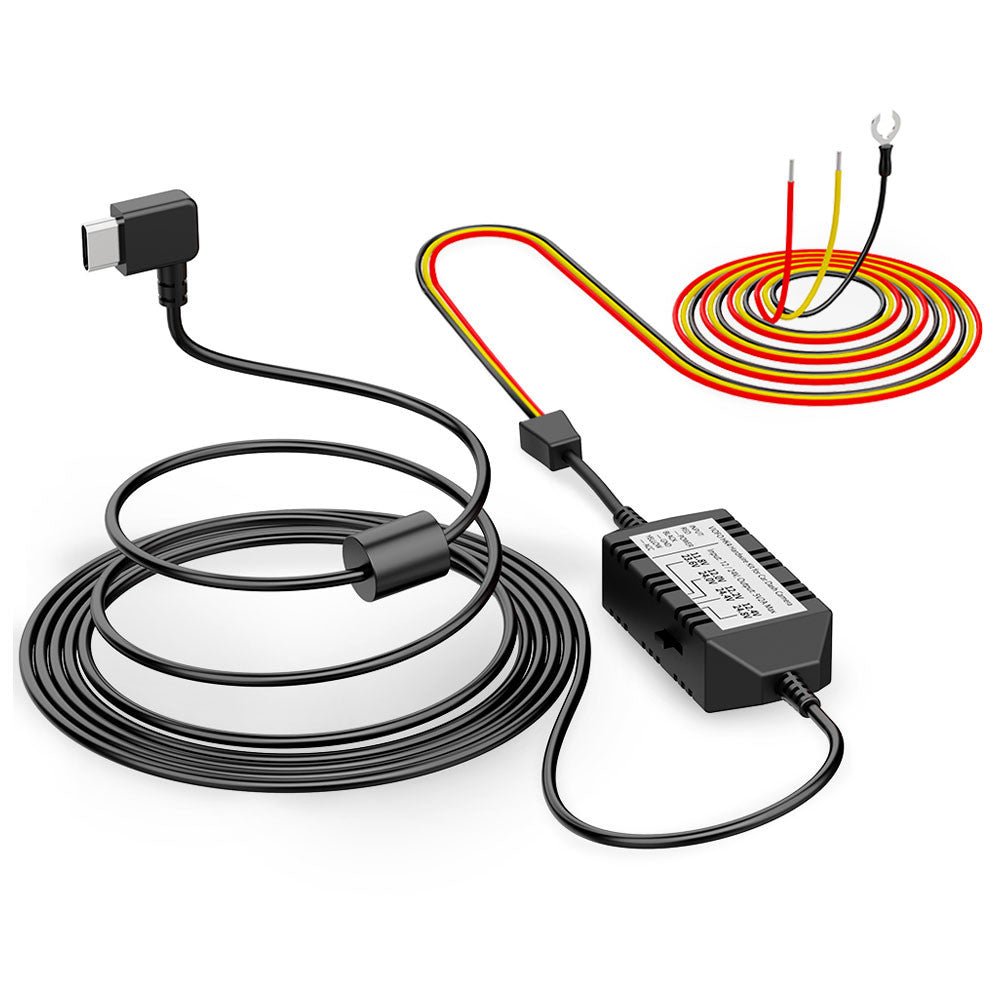
VIOFO Type-C HK6 ACC Hardwire Kit for A3
VIOFO Type-C HK4 Hardwire Cable For A119
VIOFO Mini HK3 ACC Hardwire Cable For A1
VIOFO HK3-C Type-C Hardwire Kit for A139
VIOFO Type-C HK5 Hardwire Kit For VS1 Da
VIOFO 6M (19.68ft)Type-C HK4 Hardwire Ki
2PCS Circuit Fuse Tap with Mini, Micro2,
VIOFO 4PCS*2 Packs Circuit Fuse Tap with
VIOFO Transparent Plastic Static Windshi
Spare Front and Rear Adhesive Pads Stick
GPS Module for VIOFO A229 Plus/A229 Pro/
Spare Front and Rear Adhesive Pads Stick
GPS Module for VIOFO A139/A139 PRO Front
Spare Front and Rear Adhesive Pads Stick
GPS Module for VIOFO A129/A129 IR/A129 P
Rear Mount with Double Adhesive Sticker
GPS Module for VIOFO A119V3 Car Dash Cam
Spare Front and Rear Adhesive Pads Stick
1.8M/2.5M SSD Hard Drive Data Connection
VIOFO USB-C to USB-C Charging Cable for
VIOFO D6000 Type-C Dual USB Cigarette Ca
VIOFO D5000 Type-C Dual USB Cigarette Ch
D3000 Dual USB Car Charger for A129 Pro
D2000 Dual USB Car Charger for A119V2/A1
A119 MINI/A119 MINI 2 Type-C Dual USB Ca
D2000/D3000 Mini USB 4M Long Charging Ca
VIOFO USB 2.0 Type-C to Type-C Data Cabl
Short and Portable USB-A to USB-C Data C
VIOFO RF200 1080P Infrared Interior Came
VIOFO RE200 2K Rear Camera with 6M Type-
VIOFO RC320 AHD 1080P Rear Camera with 6
VIOFO RTC300 Telephoto Camera with 0.6M
VIOFO RWC200 Waterproof Rear Camera for
VIOFO RNE800 4K HDR Rear Camera with 6M
VIOFO RWE800 4K HDR Waterproof Rear Came
VIOFO RNF210 1080P Infrared Fisheye Cabi
2K HDR Rear Camera with 6M Cable and Adh
VIOFO RTC420 2K HDR Telephoto Camera Set
VIOFO Series
Cart
Your cart is empty
Works just like the regular version just with a longer cable. Used for my rear battery mounted car.

The hardwire kit provides continuous power to your dash cam via the fuse box (VCC, ACC, GND), replacing the need for a cigarette lighter and ensuring seamless coverage from the moment you start driving.

Even when parked, the hardwire kit keeps your dash cam running by tapping into your vehicle's fuse box. It captures every important moment and automatically powers down before draining your car battery.
With ACC detection, the dash cam seamlessly enters parking mode when the vehicle's engine is turned off and resumes normal recording once the vehicle is started.

The HK4 Hardwire Cable provides continuous power to your dashcam in parking mode until your car battery voltage drops to the configured threshold.
VIOFO HK4 Hardwire Cable offers 4 voltage cut-off options. When the vehicle's battery voltage drops to the selected threshold, the HK4 stops supplying power to the dashcam, helping prevent battery discharge.

The HK4 Hardwire Cable connects the camera directly to cars, trucks, buses, SUVs, or big rigs for continuous power. It accepts voltage from any vehicle running on 12–24V.


1. Multimeter
2. Needle-nose pliers
3. Fuse puller
4. Trim removal tool

Fuse box locations and types can differ between car models, years, and variants. Refer to the car manual for specific instructions.

To check fuse locations, use a multimeter on DC voltage after turning off the vehicle. 12V or 24V indicates Battery location, while 0V indicates ACC location.

With the ignition turned on, use the multimeter to test the Battery and ACC fuse positions identified in Step 2. Both should show a voltage of approximately 12V or 24V. If not, repeat Step 2.

1. Multimeter
2. Needle-nose pliers
3. Fuse puller
4. Trim removal tool

Fuse box locations and types can differ between car models, years, and variants. Refer to the car manual for specific instructions.

To check fuse locations, use a multimeter on DC voltage after turning off the vehicle. 12V or 24V indicates Battery location, while 0V indicates ACC location.

With the ignition turned on, use the multimeter to test the Battery and ACC fuse positions identified in Step 2. Both should show a voltage of approximately 12V or 24V. If not, repeat Step 2.

Use a fuse puller to remove the fuses from the previously identified Battery and ACC positions.

Check the type of the removed fuses and confirm the correct fuse model. Then insert each fuse into the corresponding fuse tap.

Insert the metal strands of the hardwire cable into the metal tube of the fuse tap, then use needle-nose pliers to crimp the metal tube tightly.

Insert the fuse tap back into the fuse box and secure it properly to ensure a stable connection.

Use a fuse puller to remove the fuses from the previously identified Battery and ACC positions.

Check the type of the removed fuses and confirm the correct fuse model. Then insert each fuse into the corresponding fuse tap.

Insert the metal strands of the hardwire cable into the metal tube of the fuse tap, then use needle-nose pliers to crimp the metal tube tightly.

Insert the fuse tap back into the fuse box and secure it properly to ensure a stable connection.

Select a metal screw near the fuse box, loosen the screw, insert the Ground wire's metal terminal under the screw, and then tighten the screw securely.

Connect the hardwire cable's Type-C plug into the power port on the top of the dashcam's GPS mount.

Start the vehicle to power on the dashcam. Enter the dashcam settings menu and enable Parking Mode. The parking mode icon will appear at the position on the left side of the screen.

Finally, follow the recommended wiring shown in the diagram below and use the trim removal tool to hide the hardwire cable.

Select a metal screw near the fuse box, loosen the screw, insert the Ground wire's metal terminal under the screw, and then tighten the screw securely.

Connect the hardwire cable's Type-C plug into the power port on the top of the dashcam's GPS mount.

Start the vehicle to power on the dashcam. Enter the dashcam settings menu and enable Parking Mode. The parking mode icon will appear at the position on the left side of the screen.

Finally, follow the recommended wiring shown in the diagram below and use the trim removal tool to hide the hardwire cable.

1. Multimeter
2. Needle-nose pliers
3. Fuse puller
4. Trim removal tool

Fuse box locations and types can differ between car models, years, and variants. Refer to the car manual for specific instructions.

To check fuse locations, use a multimeter on DC voltage after turning off the vehicle. 12V or 24V indicates Battery location, while 0V indicates ACC location.

With the ignition turned on, use the multimeter to test the Battery and ACC fuse positions identified in Step 2. Both should show a voltage of approximately 12V or 24V. If not, repeat Step 2.

Use a fuse puller to remove the fuses from the previously identified Battery and ACC positions.

Check the type of the removed fuses and confirm the correct fuse model. Then insert each fuse into the corresponding fuse tap.

Insert the metal strands of the hardwire cable into the metal tube of the fuse tap, then use needle-nose pliers to crimp the metal tube tightly.

Insert the fuse tap back into the fuse box and secure it properly to ensure a stable connection.

Select a metal screw near the fuse box, loosen the screw, insert the Ground wire's metal terminal under the screw, and then tighten the screw securely.

Connect the hardwire cable's Type-C plug into the power port on the top of the dashcam's GPS mount.

Start the vehicle to power on the dashcam. Enter the dashcam settings menu and enable Parking Mode. The parking mode icon will appear at the position on the left side of the screen.

Finally, follow the recommended wiring shown in the diagram below and use the trim removal tool to hide the hardwire cable.
The HK6 features an always-on Bluetooth broadcast that transmits the car battery voltage—no pairing or user interaction required. Your dashcam automatically searches for the HK6's signal, reads the voltage, and displays it on the recorded video for real-time monitoring.
*Currently supports: A229 Ultra, A119 M Pro, A329S Series. App support for additional models is on the way!